
MCP servers are programs that connect AI assistants to outside tools and data sources. The Model Context Protocol, an open standard Anthropic released in 2024, lets clients like Claude and Cursor talk to GitHub, databases, and SEO platforms. For SEO teams, the best MCP servers include the open source Semust server alongside Ahrefs, Semrush, SE Ranking, Ubersuggest, and DataForSEO.
What Is an MCP Server?
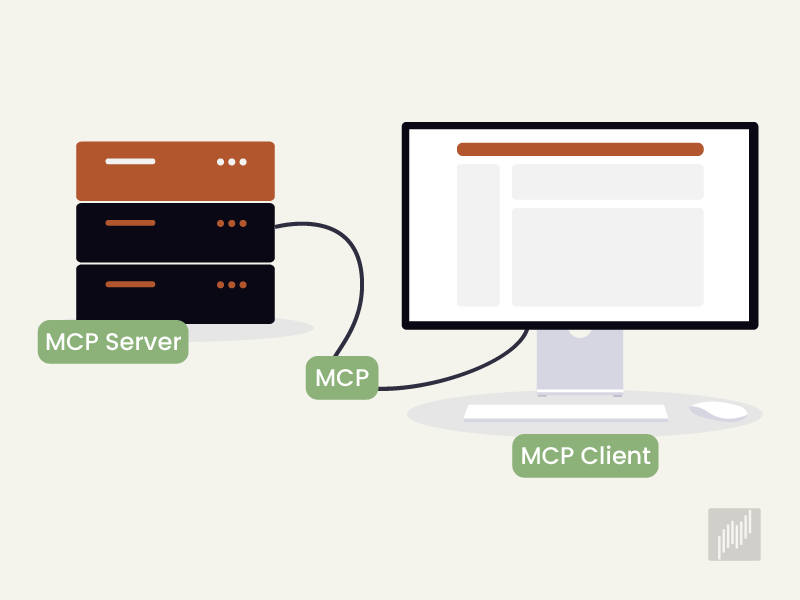
An MCP server is a small program that gives an AI assistant access to external tools and live data. Built on the Model Context Protocol, an open standard from Anthropic, it lets clients like Claude and Cursor read files, query databases, and run real actions safely.
Think of an MCP server as a universal adapter for AI. On its own, an assistant is limited to what it learned during training. A connected server removes that ceiling and gives the assistant the ability to open a file, push code, or pull live data. The result is an assistant that does real work without leaving the chat window.
How to Choose the Best MCP Server
The best MCP server for you depends on the problem you want to solve and the client you run. Judge each option by ease of setup, documentation quality, pricing model, security design, open source status, and active maintenance. Local servers that keep your data on your own machine rank highest.
Several criteria make the decision easier, and they apply to beginners and experienced teams alike. There is no single best server, because the right pick always follows your needs.
Check how easy the setup is, since servers that need heavy technical work can be hard for people who do not code.
Review the pricing model, because some servers run on a monthly subscription, some charge per use, and others stay completely free.
Weigh the number and scope of tools, since a server with around twenty tools supports a very different workflow than one with more than a hundred and sixty.
Learn where your data is processed, because local servers never move your API key off your machine.
Look at the open source status, since servers with visible code can be audited and improved by the community.
Confirm that the project is still maintained, because abandoned servers drift out of compatibility over time.
Verify which AI clients it supports, since not every server works with Claude, Cursor, or ChatGPT.
Most teams run these servers inside MCP clients such as Claude Desktop and Cursor, where each server's MCP tools appear directly in the chat as soon as it connects.
The Best MCP Servers for SEO and Search Data
The best MCP servers for SEO connect your AI assistant to real search data so you can analyze performance and competitors in plain language. Search Console based servers like Semust show your own clicks and impressions, while index based servers such as Ahrefs and Semrush supply competitor and backlink data.
Search Console based servers report on your own site's real search performance, drawing on first-party clicks, impressions, and position data. Index based servers instead pull competitor, backlink, and market data from the platform's own database. Many teams treat the two types as complements rather than rivals.
Semust MCP Server
The Semust MCP server lets lets you analyze your Google Search Console data through Claude or Cursor by asking questions in plain language. It is open source under the MIT license, free to download from GitHub, and runs entirely on your own computer. After setup, you see the Semust server and its 13 ready-made tools inside the client.
Semust keeps your API key on your own machine and never shares it with a third party. The assistant only sees the answer to the request you make, with no raw data storage and no key exchange. What sets Semust apart is that it returns interpreted SEO reports for free and locally. Where most open source Search Console servers hand back only raw numbers, Semust produces reports such as cannibalization and content decay directly.
Semust use cases center on speeding up daily SEO work. Agencies can prepare last month's report with a single command before a client meeting. Content teams can ask which questions bring in traffic and turn the answers into blog and FAQ topics. With the striking distance tool, you can surface keywords sitting between positions 11 and 30 that a small push can move onto the first page.
Google Search Console MCP Server
The Google Search Console MCP server is an open source bridge to your own site's clicks, impressions, CTR, and position data. Community built versions offer around twenty tools for search analytics, URL inspection, and sitemap management. Because it is free and based on your own data, it makes a sensible starting point for beginners.
Ahrefs MCP Server
The Ahrefs MCP server hands the backlink and keyword index that many SEO professionals trust to your AI assistant. With Site Explorer and Keywords Explorer data, you can run keyword research, rank tracking, and competitor analysis. In early 2026, the old npm based local server was retired, so the supported path is now the remote server. Use requires a paid Ahrefs subscription.
Semrush MCP Server
The Semrush MCP server is built for teams that want enterprise level competitive intelligence. Alongside keyword research, the Trends API lets you size up a market. Semrush One plans make it one of the pricier options on this list, and API usage can run down quickly in agentic workflows.
SE Ranking MCP Server
The SE Ranking MCP server stands out for the sheer number and scope of its tools. With more than a hundred and sixty officially maintained tools, it covers keyword research, backlink analysis, site audits, and SERP data. It is an all-in-one option for teams that want a broad SEO workflow in a single server, and it needs a paid SE Ranking subscription.
Ubersuggest MCP Server
The Ubersuggest MCP server connects Neil Patel's Ubersuggest platform to your AI assistant. Across seven categories and thirty-seven tools, you can run domain analysis, keyword research, backlink review, and site audits. The official server connects over OAuth 2.0 and works with clients like Claude, Cursor, and Windsurf. It is a practical pick for beginners who want a more approachable index tool, and it requires an Ubersuggest subscription.
DataForSEO MCP Server
The DataForSEO MCP server is an open source tool built for developers and custom workflows. It exposes hundreds of endpoints across the SERP, Keywords, OnPage, Backlinks, and AI Optimization APIs. It runs on a pure pay-per-use model, so a hundred related keywords cost only a couple of cents. That makes it a flexible choice for teams chasing cost efficiency.
Serpstat and Bing Webmaster Tools MCP Servers
The Serpstat MCP server is a balanced option offering keyword research, competitor analysis, semantic clustering, and site audits. The Bing Webmaster Tools MCP server covers the Bing search ecosystem with more than forty tools for site management, crawl diagnostics, and link analysis. For teams that track search engines beyond Google, the Bing server works as a useful complement.
The Best SEO MCP Servers Compared
Comparing the best SEO MCP servers side by side helps you match a tool to your needs. The table below summarizes popular servers by pricing model and standout use case.
MCP Server | Pricing Model | Best For |
|---|---|---|
Semust | Free, open source (MIT) | Performance data and ready-made SEO reports |
Google Search Console | Free, open source | Raw search analytics and URL inspection |
Ahrefs | Paid subscription | Backlink and keyword research |
Semrush | Paid subscription | Competitive intelligence and market data |
SE Ranking | Paid subscription | All-in-one broad tool set |
Ubersuggest | Paid subscription | Domain and keyword analysis |
DataForSEO | Pay per use | Developer-focused flexible data |
Serpstat | Paid subscription | Keyword research and semantic clustering |
Bing Webmaster Tools | Pay per credit | Bing ecosystem tracking |
How to Set Up and Test an SEO MCP Server
Setting up an MCP server usually means editing one configuration file in your client. In Claude Desktop you add a server entry to claude_desktop_config.json, and in Cursor you use the MCP Servers panel under Settings. After you save the file and restart the app, the new tools appear.
To add a server, you place a server entry in your client's configuration file. In Claude Desktop that file is claude_desktop_config.json, and in Cursor it lives under the MCP Servers section in Settings. For local servers you give the command and file path, and for remote servers you provide the address and credentials. Once you restart the app, the new tools become visible and ready to test.
Security for SEO MCP Servers
Security in SEO MCP servers comes down to limiting what the assistant can reach. Local servers are safer because they never move your API key off your computer. Remote and paid servers rely on authentication and usage caps, so you protect data by guarding keys and watching API limits.
A few habits keep your SEO data safe, and they apply to solo specialists and agencies alike:
Avoid sharing API keys as plain text in configuration files, because leaked keys put your account at risk.
Prefer local open source servers, since they run without sending your data to third parties.
Inspect the code or download from a trusted repository, because unverified servers can behave maliciously.
Watch your API limits on pay-per-use tools, since agentic workflows can burn through a quota faster than expected.
Separate access by user and project for agencies, because sharing a single key makes data accountability harder.
Using Several SEO MCP Servers Together
Running several SEO MCP servers at once is both possible and common. Most specialists pair a Search Console server for their own performance with an index server for market data. That setup lets them analyze their own site and competitors in the same chat. When you combine servers, avoid loading too many tools into a single prompt, since connecting many at once slows the assistant down.
Frequently Asked Questions About the Best MCP Servers
Which is the best MCP server for SEO?
The best MCP server for SEO depends on your data source. Semust suits free, first-party performance analysis, Ahrefs and Semrush cover backlinks and competitor data, and DataForSEO offers flexible pay-per-use access. Your right choice follows your workflow and budget.
What is the difference between a local and a remote MCP server?
A local MCP server runs on your computer and never moves data off your device. A remote server connects over an address and usually authenticates with OAuth. Local servers win on privacy, while remote servers are simpler to set up.
Are SEO MCP servers free?
Some SEO MCP servers are free. The Semust MCP server and open source Google Search Console servers cost nothing. Index based tools like Ahrefs, Semrush, and SE Ranking need a paid subscription, while DataForSEO charges per use.
Which AI clients do MCP servers work with?
MCP servers work with any client that supports the Model Context Protocol. Claude Desktop and Cursor are the most common, and some servers also work with ChatGPT and Gemini. Confirm compatibility with your target client before you install one.
Ready to bring your search data into the same window as your AI assistant? Install the Semust MCP server for free, then try every Semust tool free for 14 days. From keyword tracking to technical SEO crawls, you can start working from one platform today.

Ramazan Umutlu
Ramazan Umutlu is a digital strategist with 10 years of SEO experience and the founder of Semust. Driven by the vision of Semust—an initiative born from his deep-rooted passion for software development—he bridges the requirements of SEO with innovative solutions. His work primarily focuses on technical SEO, organic growth, and data analysis.