
A page's Google index status is the first thing that decides whether your site can earn organic traffic at all. A page that never gets indexed cannot show up in search results, so it draws no visitors no matter how strong the content is. Industry data suggests that roughly 10–15% of pages on mid-sized sites stay out of Google's index. A Google index checker spots these gaps early by confirming which URLs Google has stored and which ones it has skipped.
What is the Google Index and How Does It Work?
The Google index is the database where Google stores the web pages it has crawled and approved. Once a page enters this index, it becomes eligible to appear in relevant searches. A page that stays outside the index cannot rank, regardless of its content quality or keyword choices.
Google indexing works a lot like a public library. Search engines run algorithms to store billions of URLs, and crawlers visit each page, read the content, and place the suitable ones on the shelves. Until a book (a web page) sits on a shelf, no reader (a searcher) can find it.
So the indexing process is the real starting point of any SEO work. A newly published page can take anywhere from a few hours to a few weeks to get indexed, which is part of why knowing how to check when the page became indexed in Google matters so much.
The Stages of Google Indexing
Google indexing happens in three stages, and a page can fail at any one of them:
During crawling, Googlebot visits your site's URLs and reads the content it finds.
During processing, Google renders JavaScript, CSS, and images so the page is interpreted in its final form.
During indexing, Google checks content quality and originality, then stores the pages it finds worthy in its database.
If something breaks at any stage, the page stays out of the index. A wrong directive in your robots.txt file, for example, can block crawling before it even starts.
Why You Should Monitor Your Google Index Status
Monitoring your Google index status is an audit process that helps you catch indexing problems early. On sites without regular checks, owners often notice dropped pages only after traffic falls. By then, recovering the lost revenue can take a long time, and rankings may not fully return.
Running a Google index check on a regular basis gives you several clear advantages:
You can see quickly whether new content has made it into the index.
You can identify which pages were affected after an algorithm update.
You can observe how technical SEO mistakes change your overall index rate.
Which Industries Need Index Monitoring Most?
Index monitoring pays off more in some industries than others:
E-commerce sites carry thousands of product pages, so any index loss directly cuts into sales.
News sites miss timely traffic when their content does not get indexed fast enough.
Brands running corporate blogs want the content they invest in to stay visible.
Local service sites depend on every page being indexed to keep finding new customers.
What is a Google Index Checker and How Does It Work?
A Google index checker is software that automatically tracks the status of your site's URLs inside Google's index. Instead of querying pages one by one, you load your full URL list into the tool, and it pulls indexing data from Google and reports it back to you in one view.
Manual index checks waste a lot of time. To learn whether a single URL sits in the index, you have to run a “site:” search on Google. On a 500-page site, that process can take hours and still leave you with inconsistent data. A bulk Google index checker removes that manual effort by scanning every URL in the background and surfacing changes on its own.
Semust's Google Index Monitor scans your URLs in the background and reflects any change in your panel. If a page drops out of the index or a new page is added, you see it. Because the data comes straight from Google, there is no guesswork involved.
What Data Does the Semust Google Index Monitor Show?
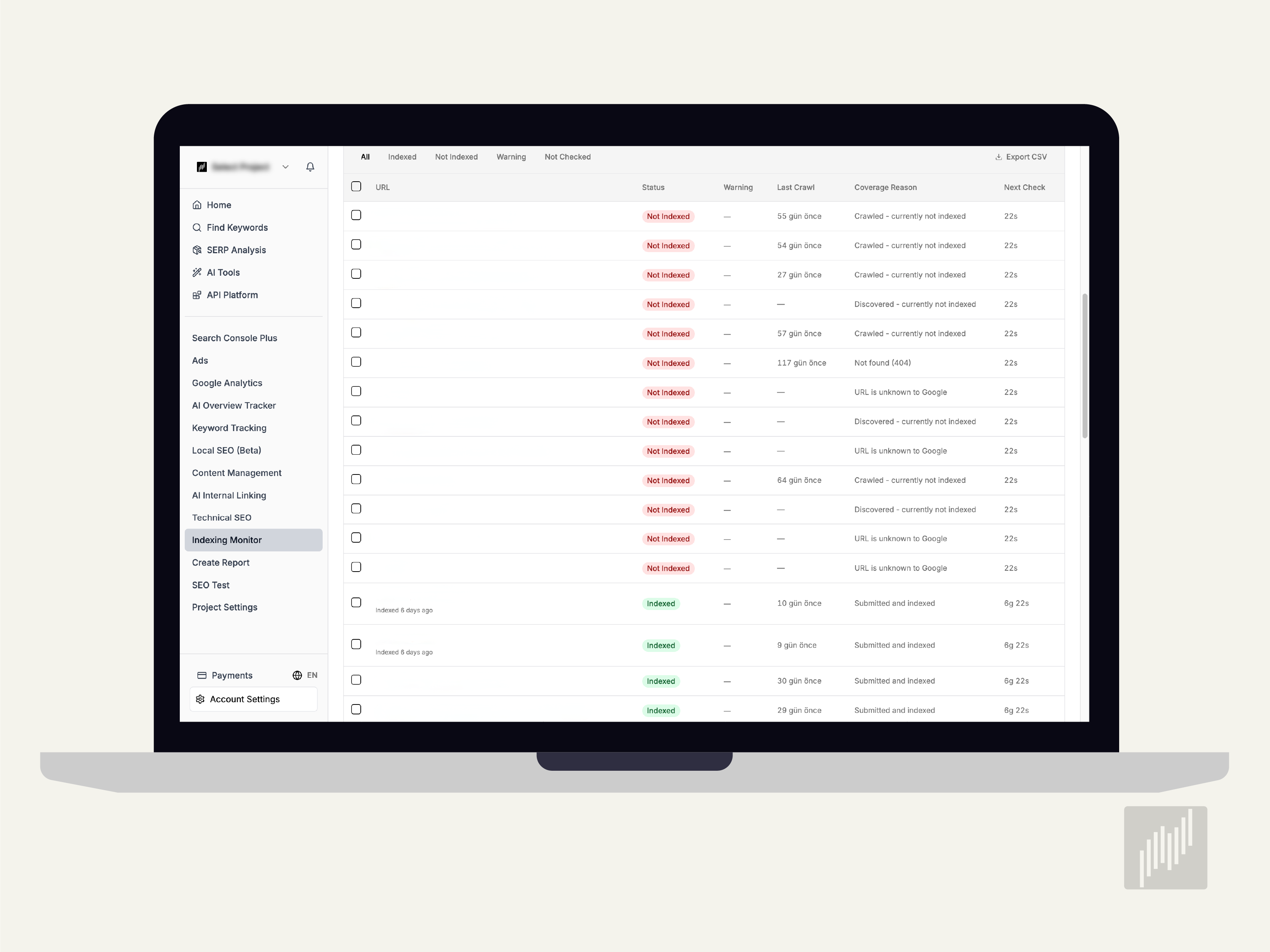
Semust Google Index Monitor gives you detailed data on a per-URL basis. For every page, it lists the last crawl date, the index status, and the coverage message Google returned.
Indexed URLs appear with a green label and are re-scanned about once a week.
Pages that are not indexed get a red warning and are rechecked every day.
Unchecked URLs wait in the scan queue and are processed when their turn comes.
For pages flagged with a warning, the tool shares the reason message that Google provided.
A Closer Look at Semust Google Index Monitor Features
Semust Google Index Monitor combines automatic URL detection, a health score, detailed coverage messages, an index history graph, and CSV export in one panel. Together these features turn raw Search Console data into a tracking system you can act on without manual checks.
URL Index Tracking and Automatic Auditing
URL index tracking lets you monitor the status of every page on your site in a structured way. Semust audits your project's URLs automatically through your sitemap file and Google Search Console data, so you do not have to enter each URL by hand.
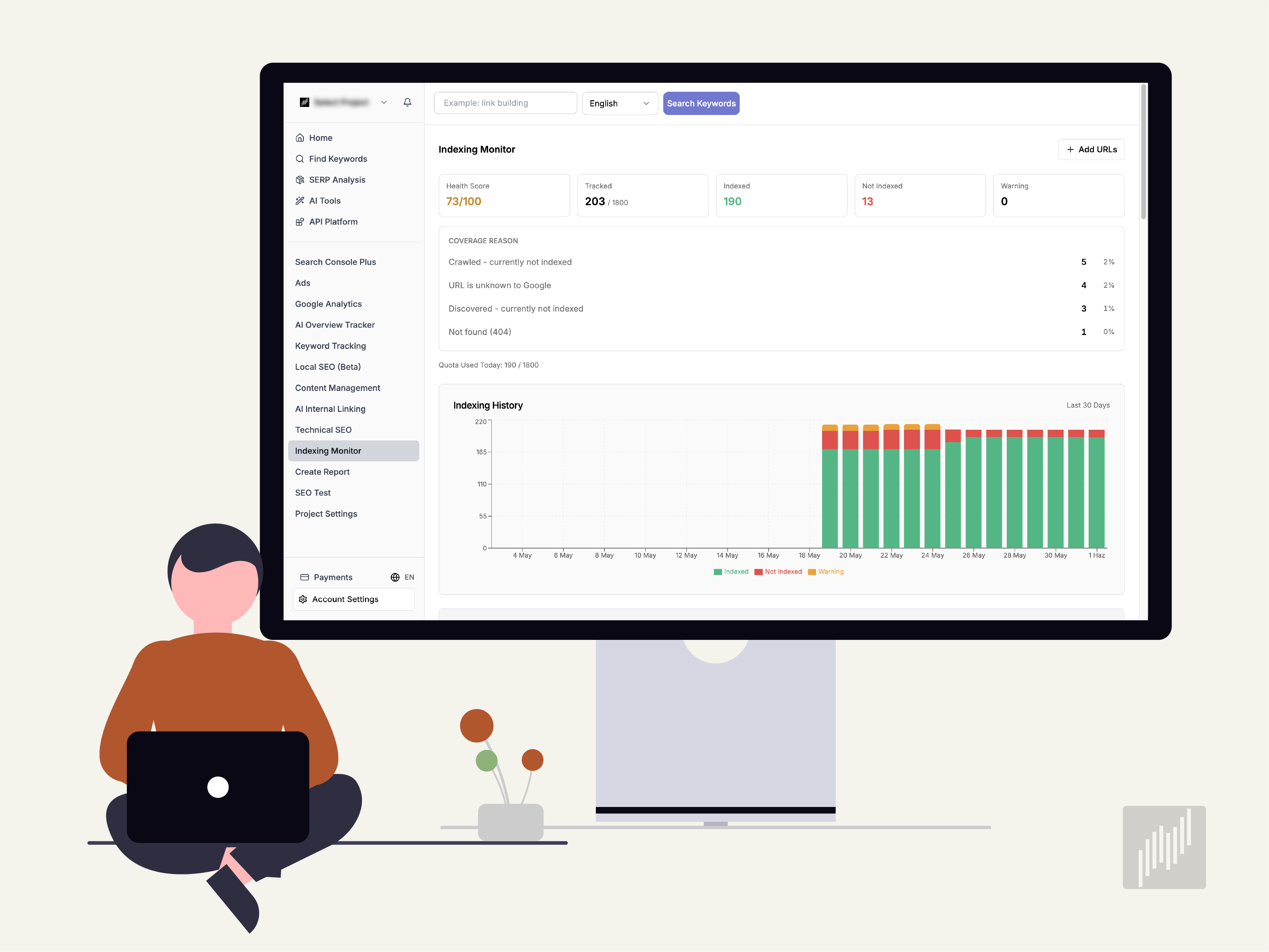
You can also add URLs manually whenever you need to. Each project supports tracking for up to 1,800 URLs, and your daily usage quota is shown at the top of the panel.
A Quick Overview with the Health Score
The health score shows how many of your tracked URLs are indexed without problems, rated out of 100. A high score means your site's Google indexing rate is in good shape, while a drop points to a new indexing problem. This single number gives you a fast read on your indexing performance.
Detailed Coverage Status Messages
Coverage status messages explain why a page that is not indexed has been left out. Semust lists these messages per URL and shows you exactly which page has which problem.
These messages speed up your troubleshooting, since each cause calls for a different action. A page marked "Crawled currently not indexed" needs stronger content, while a "Not found 404" page needs a 301 redirect.
The Index History Graph
The index history graph lets you follow your indexing trend over the last 30 days on a single chart. You can see visually which dates you gained pages and which dates you lost them.
The graph also helps you observe the effect of algorithm updates and your own site changes. If your index rate climbs after a new technical SEO project, you can see plainly that the work paid off.
Exporting Your Data as CSV
CSV export lets you download all of your index data to your computer with a single click. You can share this data with your team, drop it into reports, or filter it in Excel for deeper data analysis. It keeps your indexing records portable and easy to reuse.
Google Coverage Status Messages and What They Mean
Google coverage status messages appear in Search Console and inside Google index checker tools. Each message carries a different meaning and a different fix, so reading them correctly is the first step toward solving an indexing problem. The table below covers the situations you will run into most often.
Coverage Message | What It Means | Recommended Action |
|---|---|---|
Submitted and indexed | The page was added to the index successfully | No action needed; keep an eye on its ranking |
Crawled — currently not indexed | The page was crawled but not indexed | Strengthen the content and add internal links |
Discovered — currently not indexed | The URL is known but not yet crawled | Update your sitemap and start a URL inspection |
Not found (404) | The page could not be found | Set up a 301 redirect or remove it |
URL is unknown to Google | Google does not recognize the address | Add it to your sitemap and run a manual inspection |
Excluded by 'noindex' tag | The page is excluded by a noindex tag | Check the tag and remove it if it should not be there |
Duplicate, Google chose different canonical | Duplicate content was detected | Review your canonical tag |
Semust lists these messages automatically and shows which page carries which problem, so you spend your time fixing issues rather than hunting for them.
How to Fix Pages That Are Not Indexed
Pages that are not indexed can be fixed once they are diagnosed correctly. There is no single formula that works for every cause, so the action you take depends on the coverage message behind the problem. Content issues and technical issues are the two most common reasons a page stays out of the index.

Fixing Content Quality Problems
Content quality is usually the root cause behind a "Crawled currently not indexed" message. Google decides the page does not produce enough value and leaves it out of the index.
Expand the content on the page and enrich it with original information.
Build internal links to raise the page's authority.
Add media like images and video to improve the user experience.
Find similar pages and either merge them or make them clearly distinct.
Fixing Technical Problems
Technical SEO is another area that has a strong effect on indexing. If a page is not accessible, Google cannot crawl it and cannot add it to the index.
Check your robots.txt file and remove any incorrect blocking rules.
Delete the noindex tag from any page you actually want indexed.
Make sure your canonical tags point to the correct URL.
Improve page speed and fix your Core Web Vitals metrics.
Semust Index Monitor vs. Google Search Console
Google Search Console and Semust Google Index Monitor work as complementary tools. Search Console is Google's official source of indexing data, while Semust presents that same data in a more usable format and automates the tracking process for you.
Google Search Console | Semust Google Index Monitor | |
|---|---|---|
Data source | Official Google data | Pulls from the same Google data |
URL view | One report at a time | All URLs collected in a single list |
Health scoring | Not available | Health score out of 100 |
History | Limited historical view | Index history graph for the last 30 days |
Export | Manual export | One-click CSV export |
Semust Index Monitor collects all your URLs in one list, assigns a health score, and shows your index history on a graph. You can download problem pages as a CSV file and share them with your team. In short, Semust makes Search Console data faster to act on.
Frequently Asked Questions About Google Index Checking
How do I check if a page is indexed by Google?
To check if a page is indexed, run a site:yourdomain.com/page search on Google, or use the URL Inspection tool in Search Console. For many pages at once, a bulk Google index checker like Semust reports every URL's status automatically in one place.
How long does it take for a new page to get indexed?
New pages can take anywhere from a few hours to a few weeks to get indexed. Site authority, internal linking, and content quality all affect the timing. Starting a URL inspection in Search Console can speed things up, and Semust tracks the result for you automatically.
Can I run a bulk Google index check?
Yes. A bulk Google index checker lets you verify hundreds of URLs at once instead of querying them one by one. Semust scans your full URL list in the background, flags pages that are not indexed, and updates the status on its own.
Why do pages drop out of Google's index?
Pages drop out when content goes stale, technical errors appear, or manual penalties hit. Duplicate content and low-quality signals can lead to the same result. Without regular monitoring, the loss can go unnoticed for a long time, which is why ongoing tracking reflects drops to your panel quickly.
Checking your pages' Google index status by hand eats up time you could spend on real SEO work. Semust's Google Index Monitor automates that process: your URLs are scanned in the background, problems are listed for you, and every piece of data you need to fix them sits in one panel. Start your 14-day free trial of Semust and see your site's indexing health for yourself, then leave your index problems behind.

Ramazan Umutlu
Ramazan Umutlu is a digital strategist with 10 years of SEO experience and the founder of Semust. Driven by the vision of Semust—an initiative born from his deep-rooted passion for software development—he bridges the requirements of SEO with innovative solutions. His work primarily focuses on technical SEO, organic growth, and data analysis.